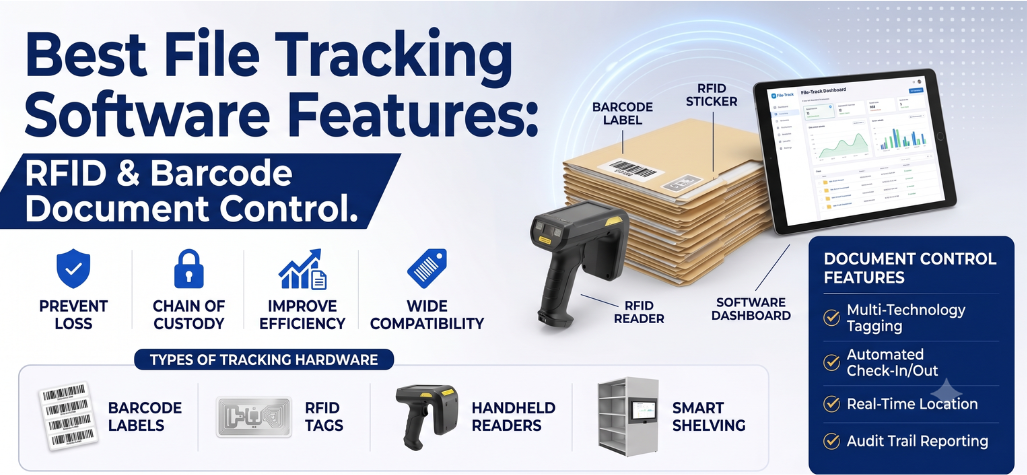
File tracking software is a digital management system designed to monitor the exact location, movement, and status of physical folders and documents. In industries that handle highly sensitive information—such as law firms, healthcare facilities, and government agencies—managing physical files presents significant operational challenges. Misplaced legal documents, lost medical records, and poorly managed corporate documents can lead to costly delays, operational bottlenecks, and severe compliance risks.
By integrating modern technologies like RFID (Radio Frequency Identification) and barcode tagging, physical document tracking software automates the identification process. This technology eliminates manual logbooks, replacing them with a centralized database that delivers real-time location visibility, strict user accountability, robust security, and comprehensive auditability for every physical asset in your organization.
Key Features to Demand in Physical File Tracking Software
When evaluating solutions for records management, organizations must look for specific functionalities that align with their operational security and document control requirements.
Barcode & RFID Tagging Compatibility
- Feature: Multi-Technology Tagging
- Business Value: Provides the flexibility to scale tracking methods based on budget, volume, and file importance.
- Practical Use: Apply cost-effective barcode labels to general corporate files, while utilizing advanced RFID tags for high-value legal contracts.
Modern file tracking relies heavily on physical folder tagging. A robust system supports both barcode labels and RFID tags, utilizing scanners and readers to identify physical files. Organizations can choose between barcode tracking for straightforward line-of-sight scanning or RFID technology for automated, bulk identification, depending entirely on their specific workflow requirements and operational budgets.
Chain of Custody & Check-In/Check-Out Logging
A chain of custody is a chronological, documented trail showing the sequence of control, transfer, and disposition of a physical file. File tracking software manages this through a rigorous check-in/check-out workflow. When a user removes a file from the records room, they must scan it out under their user profile. The software instantly records exactly who accessed the file, when it was moved, and where it is going. This guarantees strict accountability and ensures robust document control across all departments.
Real-Time Location Search & Smart Shelf Integration
Locating misplaced folders is a primary driver for adopting tracking software. Users can search for specific files within the system dashboard to immediately determine their currently recorded location. For organizations needing maximum automation, RFID Smart Shelving integrations take this a step further. Smart shelves contain built-in antennas that constantly read the RFID tags of the folders resting on them. If a file is removed or placed on the wrong shelf, the system updates its real-time location automatically, revolutionizing physical records management without requiring manual user scanning.
Compliance & Security Audit Reporting
An effective record tracking system must maintain a permanent historical record of all file movements and user activity. Comprehensive audit trails allow compliance officers to generate reports showing every individual who has handled a specific document over its lifecycle. By enforcing digital access control and maintaining strict security logs, organizations can confidently produce historical records during internal audits or external compliance reviews.
Barcode vs. RFID File Tracking: Which Fits Your Document Workflow?
Choosing between barcode and RFID technologies is a critical decision. The right technology depends on file volume, daily workflow, scanning requirements, budget, physical environment, and your desired level of automation.
Feature | Barcode File Tracking | RFID File Tracking |
Identification | Line-of-sight optical scanning | Radio frequency signal transmission |
Scanning process | Manual, one label at a time | Automated, multiple tags simultaneously |
Multiple-item reading | No | Yes (reads entire stacks or boxes instantly) |
Automation potential | Low | High |
Location tracking | Based on the last scanned location point | Real-time monitoring (with smart readers) |
Typical use cases | Low-volume environments, budget-conscious | High-volume archives, high-security facilities |
Infrastructure requirements | Barcode scanners, printed labels | RFID readers, antennas, encoded smart tags |
Neither technology is universally better than the other; a high-volume medical archive may require RFID for efficiency, while a smaller corporate office may find barcode tracking perfectly adequate for its needs.
Step-by-Step Implementation Framework
Deploying file tracking software requires careful planning. Follow this practical framework for a successful rollout:
- Assess the current physical file workflow: Map out how documents currently move through your organization.
- Identify file types and tracking requirements: Determine which records are critical and require stringent monitoring.
- Select barcode, RFID, or a combined approach: Choose the hardware technology that matches your operational needs.
- Tag files and folders: Apply the chosen identification labels or smart tags to your physical inventory.
- Configure users, locations, and permissions: Set up digital profiles and define who has access to specific document categories.
- Set up scanners, readers, or smart shelving where required: Install the physical hardware infrastructure at strategic checkpoints.
- Configure check-in/check-out workflows: Establish the operational rules for removing and returning files.
- Connect the software with relevant databases or business systems: Integrate the tracking system with existing legal or medical management platforms.
- Test the workflow: Run a pilot program with a small batch of files to ensure hardware and software communicate properly.
- Train users and monitor system performance: Educate staff on the new protocols and regularly review audit logs for compliance.
File Tracking Solutions by AIDC Technologies
AIDC Technologies provides advanced file tracking and document management solutions designed to help organizations improve the security, visibility, and control of physical records. By combining barcode and RFID technologies with modern tracking software, AIDC helps businesses monitor file movements, manage check-in and check-out activities, locate documents efficiently, and maintain reliable audit trails. These solutions are suitable for offices, government departments, healthcare facilities, legal organizations, libraries, and other environments where accurate physical document management is essential. https://aidcindia.org/
For reliable file tracking software and customized document management solutions, Contact us to discuss your organization’s specific requirements.
Frequently Asked Questions
- What is file tracking software?
File tracking software is a digital management system used to monitor the exact location, movement, and status of physical folders and documents. It replaces manual logbooks with a centralized database to prevent lost files.
- How does physical document tracking software work?
Physical document tracking software works by associating a physical file with a digital profile using a unique barcode or RFID tag. When the physical tag is scanned by a reader, the software updates the file’s current location and custodian in the database.
- Can file tracking software use both RFID and barcodes?
Yes, file tracking software can use both RFID and barcodes simultaneously. Many organizations use an integrated approach, deploying inexpensive barcodes for general files and advanced RFID tags for high-priority documents.
- What is RFID file management?
RFID file management is a tracking method that utilizes radio frequency signals to identify folders. Instead of scanning one barcode at a time, RFID allows systems to instantly read entire stacks or boxes of files simultaneously without direct line-of-sight.
- What is a chain of custody in file tracking?
A chain of custody in file tracking is the unbroken, chronological digital log detailing exactly who has controlled, transferred, or accessed a physical document from the moment of its creation to its final disposition.
- How does RFID smart shelving help track files?
RFID smart shelving helps track files by using built-in antennas to continuously scan the folders resting on the shelf. It automatically updates the tracking software in real time, alerting administrators if a file is misplaced or removed without authorization.
- Is file tracking software suitable for legal and medical records?
Yes, file tracking software is highly suitable for these sectors. In fact, utilizing RFID file tracking software for legal and medical records management is a standard best practice to ensure sensitive client and patient data remains secure, accountable, and easy to locate.
- What features should businesses look for in a record tracking system?
Businesses should look for multi-technology tagging support, intuitive check-in/check-out workflows, comprehensive compliance audit reporting, and real-time location search capabilities to ensure complete physical file tracking visibility.